Mapping gene ids is one of the routine jobs for bioinformatics. I was aware of several ways to do it including Biomart.
Update on 10/30/14, a mygene bioconductor package is online http://bioconductor.org/packages/release/bioc/html/mygene.html
Recently I got to know mygene, a python wrapper for the mygene.info services to map gene ids.
I found it very handy to convert gene ids. see a gist below.
To use it, cat input.txt | python geneSymbol2Entrez.py > output.txt
or python geneSymbol2Entrez.py input.txt > output.txt where input.txt contains one gene name in each line. pretty neat!

This blog by Tommy Tang is licensed under a Creative Commons Attribution-ShareAlike 4.0 International License.
Wednesday, September 3, 2014

Thursday, August 14, 2014
rename a bunch of files with bash by regular expression
I am at the MSU NGS 2014 course. My colleague wanted to follow the khmer protocol with his own data, but one of the steps has to use a certain file name convention.
the rename command use the perl regular expression. use \ to escape $.
the sed command need to escape the () which are used to capture the back reference
before:
tommy@tommy-ThinkPad-T420:~/foo$ ls 1_egg_r1_01_sub.fastq.gz 2_egg_r1_01_sub.fastq.gz 3_egg_r1_01_sub.fastq.gz 4_egg_r1_01_sub.fastq.gz copy make_dummy_file_1.sh 1_egg_r1_02_sub.fastq.gz 2_egg_r1_02_sub.fastq.gz 3_egg_r1_02_sub.fastq.gz 4_egg_r1_02_sub.fastq.gz dummy make_dummy_file_2.sh 1_egg_r2_01_sub.fastq.gz 2_egg_r2_01_sub.fastq.gz 3_egg_r2_01_sub.fastq.gz 4_egg_r2_01_sub.fastq.gz files.txt rename.sh 1_egg_r2_02_sub.fastq.gz 2_egg_r2_02_sub.fastq.gz 3_egg_r2_02_sub.fastq.gz 4_egg_r2_02_sub.fastq.gz make_dummy_file.sh rename_one_liner.sh
after:
tommy@tommy-ThinkPad-T420:~/foo$ ls 1egg_R1_001.fastq.gz 2egg_R1_001.fastq.gz 3egg_R1_001.fastq.gz 4egg_R1_001.fastq.gz copy make_dummy_file_1.sh 1egg_R1_002.fastq.gz 2egg_R1_002.fastq.gz 3egg_R1_002.fastq.gz 4egg_R1_002.fastq.gz dummy make_dummy_file_2.sh 1egg_R2_001.fastq.gz 2egg_R2_001.fastq.gz 3egg_R2_001.fastq.gz 4egg_R2_001.fastq.gz files.txt rename.sh 1egg_R2_002.fastq.gz 2egg_R2_002.fastq.gz 3egg_R2_002.fastq.gz 4egg_R2_002.fastq.gz make_dummy_file.sh rename_one_liner.sh
References: http://stackoverflow.com/questions/399078/what-special-characters-must-be-escaped-in-regular-expressions
http://stackoverflow.com/questions/10929453/bash-scripting-read-file-line-by-line
https://www.cs.tut.fi/~jkorpela/perl/regexp.html
In the protocol it requires fastq files listed as: *001_R1.fastq.gz
001 is the replicate number, it can be 002 or 003 or any number of replicates you have. ( for RNA-seq, sequence as many as biological samples as possible !)
R1 is the pair-end reads 1, it can be R2
What he has is something like:
1_egg_r1_01_sub.fastq.gz
1 is the stage of the egg. He sequenced 4 eggs, so he has 1_egg, 2_egg., 3_egg and 4_egg
r1 is the pair-end reads 1
01 is the first replicates. He has two replicates for each egg.
Basically, he wants to rename these files to the khmer convention.
This problem gets down to writing a regular expression.
To recapture the problem, I made some dummy files:
mkdir foo && cd foo
I have a txt file contains the names of the file:
foo$ cat files.txt
1egg_r1_01_sub.fastq.gz
1egg_r2_01_sub.fastq.gz
1egg_r1_02_sub.fastq.gz
1egg_r2_02_sub.fastq.gz
2egg_r1_01_sub.fastq.gz
2egg_r2_01_sub.fastq.gz
2egg_r1_02_sub.fastq.gz
2egg_r2_02_sub.fastq.gz
3egg_r1_01_sub.fastq.gz
3egg_r2_01_sub.fastq.gz
3egg_r1_02_sub.fastq.gz
3egg_r2_02_sub.fastq.gz
4egg_r1_01_sub.fastq.gz
4egg_r2_01_sub.fastq.gz
4egg_r1_02_sub.fastq.gz
4egg_r2_02_sub.fastq.gz
Now I want to make dummy files with the names in this file.
one can make the dummy files in a fly also.
=====update on 08/26/14======
one can use the {} expansion to create the dummy files
tommy@tommy-ThinkPad-T420[foo] touch {1,2,3,4}_r{1,2}_0{1,2}_sub.fastq.gz
tommy@tommy-ThinkPad-T420[foo] ls [ 3:45PM]
1_r1_01_sub.fastq.gz 2_r2_01_sub.fastq.gz 4_r1_01_sub.fastq.gz
1_r1_02_sub.fastq.gz 2_r2_02_sub.fastq.gz 4_r1_02_sub.fastq.gz
1_r2_01_sub.fastq.gz 3_r1_01_sub.fastq.gz 4_r2_01_sub.fastq.gz
1_r2_02_sub.fastq.gz 3_r1_02_sub.fastq.gz 4_r2_02_sub.fastq.gz
2_r1_01_sub.fastq.gz 3_r2_01_sub.fastq.gz
2_r1_02_sub.fastq.gz 3_r2_02_sub.fastq.gz
========================
=====update on 08/26/14======
one can use the {} expansion to create the dummy files
tommy@tommy-ThinkPad-T420[foo] touch {1,2,3,4}_r{1,2}_0{1,2}_sub.fastq.gz
tommy@tommy-ThinkPad-T420[foo] ls [ 3:45PM]
1_r1_01_sub.fastq.gz 2_r2_01_sub.fastq.gz 4_r1_01_sub.fastq.gz
1_r1_02_sub.fastq.gz 2_r2_02_sub.fastq.gz 4_r1_02_sub.fastq.gz
1_r2_01_sub.fastq.gz 3_r1_01_sub.fastq.gz 4_r2_01_sub.fastq.gz
1_r2_02_sub.fastq.gz 3_r1_02_sub.fastq.gz 4_r2_02_sub.fastq.gz
2_r1_01_sub.fastq.gz 3_r2_01_sub.fastq.gz
2_r1_02_sub.fastq.gz 3_r2_02_sub.fastq.gz
========================
The difference of make_dummy_file.sh and make_dummy_file_1.sh is that I specified shebang line in the make_dummy_file.sh script to tell the bash that it is a bash script, to invoke it: ./make_dummy_file.sh files.txt
In contrast, to invoke the other two which I did not specify the shebang: bash make_dummy_file_1.sh bash make_dummy_file_2.sh
Rename the files with regular expression by either using sed or rename command
In contrast, to invoke the other two which I did not specify the shebang: bash make_dummy_file_1.sh bash make_dummy_file_2.sh
Rename the files with regular expression by either using sed or rename command
the sed command need to escape the () which are used to capture the back reference
before:
tommy@tommy-ThinkPad-T420:~/foo$ ls 1_egg_r1_01_sub.fastq.gz 2_egg_r1_01_sub.fastq.gz 3_egg_r1_01_sub.fastq.gz 4_egg_r1_01_sub.fastq.gz copy make_dummy_file_1.sh 1_egg_r1_02_sub.fastq.gz 2_egg_r1_02_sub.fastq.gz 3_egg_r1_02_sub.fastq.gz 4_egg_r1_02_sub.fastq.gz dummy make_dummy_file_2.sh 1_egg_r2_01_sub.fastq.gz 2_egg_r2_01_sub.fastq.gz 3_egg_r2_01_sub.fastq.gz 4_egg_r2_01_sub.fastq.gz files.txt rename.sh 1_egg_r2_02_sub.fastq.gz 2_egg_r2_02_sub.fastq.gz 3_egg_r2_02_sub.fastq.gz 4_egg_r2_02_sub.fastq.gz make_dummy_file.sh rename_one_liner.sh
after:
tommy@tommy-ThinkPad-T420:~/foo$ ls 1egg_R1_001.fastq.gz 2egg_R1_001.fastq.gz 3egg_R1_001.fastq.gz 4egg_R1_001.fastq.gz copy make_dummy_file_1.sh 1egg_R1_002.fastq.gz 2egg_R1_002.fastq.gz 3egg_R1_002.fastq.gz 4egg_R1_002.fastq.gz dummy make_dummy_file_2.sh 1egg_R2_001.fastq.gz 2egg_R2_001.fastq.gz 3egg_R2_001.fastq.gz 4egg_R2_001.fastq.gz files.txt rename.sh 1egg_R2_002.fastq.gz 2egg_R2_002.fastq.gz 3egg_R2_002.fastq.gz 4egg_R2_002.fastq.gz make_dummy_file.sh rename_one_liner.sh
References: http://stackoverflow.com/questions/399078/what-special-characters-must-be-escaped-in-regular-expressions
http://stackoverflow.com/questions/10929453/bash-scripting-read-file-line-by-line
https://www.cs.tut.fi/~jkorpela/perl/regexp.html
Friday, August 8, 2014
R commands basics
we are on day 5 of the MSU NGS course. This morning, Ian Dworkin introduced some basic R.
I found it refreshing and put a gist below.
Pick one language, and learn it well!
pick up a dataset, and play with it! Happy coding!
By the way, the food here at KBS is amazing, I am gaining weight :)
I found it refreshing and put a gist below.
Pick one language, and learn it well!
pick up a dataset, and play with it! Happy coding!
By the way, the food here at KBS is amazing, I am gaining weight :)
Thursday, August 7, 2014
Understanding the Forward strand and Reverse strand and the coordinates systems
we are on day 4 of the MSU NGS course. In the morning, instructor Istvan introduced Genomic Intervals.
To understand the coordinates system, one needs to understand the strandness of DNA.
sense strand is the coding strand
anti-sense strand is the reverse-complementary strand of the coding strand
see details below:
https://www.biostars.org/p/3423/
https://www.biostars.org/p/3908/
again, everything is on biostar :)
I drew a picture to better understand it

remember:
coordinates are reported 5'---> 3' forward strand
transcription occurs from 5' to 3'
forward/plus strand and reverse/reverse strand are designated arbitrarily.
Imagine that you can flip over the example I drew, then gene A would be in minus strand.
# 0-based and 1-based coordinates system
0 based and 1 based coordinates cheat sheet
https://www.biostars.org/p/84686/
various formats: http://genome.ucsc.edu/FAQ/FAQformat.html
GFF3 specification: http://www.sequenceontology.org/gff3.shtml
0-based formats:BED, wiggle, BEDGRAPH
1-based formats: GFF, GTF, GBK (genebank file), SAM, VCF
# lift over coordinates
lift-over between different versions of genome https://genome.ucsc.edu/util.html
Generally do not do it, just map to the right version of interest.
By the way, the latest human genome GRCh38 is released: http://www.ensembl.info/blog/2014/08/07/ensembl-76-has-been-released/
sense strand is the coding strand
anti-sense strand is the reverse-complementary strand of the coding strand
see details below:
https://www.biostars.org/p/3423/
https://www.biostars.org/p/3908/
again, everything is on biostar :)
I drew a picture to better understand it
remember:
coordinates are reported 5'---> 3' forward strand
transcription occurs from 5' to 3'
forward/plus strand and reverse/reverse strand are designated arbitrarily.
Imagine that you can flip over the example I drew, then gene A would be in minus strand.
# 0-based and 1-based coordinates system
0 based and 1 based coordinates cheat sheet
https://www.biostars.org/p/84686/
various formats: http://genome.ucsc.edu/FAQ/FAQformat.html
GFF3 specification: http://www.sequenceontology.org/gff3.shtml
0-based formats:BED, wiggle, BEDGRAPH
1-based formats: GFF, GTF, GBK (genebank file), SAM, VCF
# lift over coordinates
lift-over between different versions of genome https://genome.ucsc.edu/util.html
Generally do not do it, just map to the right version of interest.
By the way, the latest human genome GRCh38 is released: http://www.ensembl.info/blog/2014/08/07/ensembl-76-has-been-released/
Wednesday, August 6, 2014
linux commands basics
I am attending the NGS course at MSU. This is a great course with great instructors and friendly colleagues.
I highly recommend this course to everyone. http://bioinformatics.msu.edu/ngs-summer-course-2014
This morning, we learned SNP calling by samtools and sam file specification (I will write another blog for the SNP calling) .in the night , TA Elijah gave an awesome introduction to linux commands.
personally, I think this should be taught in the first day of the course. ( I am already pretty familiar with basic linux commands, but it does cause a lot of frustrations for beginners).
I took the notes, and put the commands that taught in a gist, see below and enjoy linux commands!
linux basics by Tommy Tang is licensed under a Creative Commons Attribution-ShareAlike 4.0 International License.
I highly recommend this course to everyone. http://bioinformatics.msu.edu/ngs-summer-course-2014
This morning, we learned SNP calling by samtools and sam file specification (I will write another blog for the SNP calling) .in the night , TA Elijah gave an awesome introduction to linux commands.
personally, I think this should be taught in the first day of the course. ( I am already pretty familiar with basic linux commands, but it does cause a lot of frustrations for beginners).
I took the notes, and put the commands that taught in a gist, see below and enjoy linux commands!
linux basics by Tommy Tang is licensed under a Creative Commons Attribution-ShareAlike 4.0 International License.
Friday, July 25, 2014
run a local blast
I was checking the quality of a ChIP-seq fastq with fastqc, and the overrepresented sequence showed that the data contain Illumina Single End Adapter 1 contamination.

I have a file which contains all the possible illumina library sequences in fasta format (got from here), and I manually looked it and found that the single End Adapter 1 sequence did not match the report. I then was wondering which sequence is the contamination. To do that, I have to do a local blast of the overrepresented sequence "GATCGGAAGAGCTCGTATGCCGTCTTCTGCTTAGATCGGAAGAGCTCGTATGCC"
on the illumina library sequences.
Luckily, the ncbi_blast was installed on the HPC. One can follow the link here run local blast
first, use the formatdb command to convert the file to a database
$ module load ncbi_blast
# check what arguments are for the command
$ formatdb -
formatdb 2.2.26 arguments:
-t Title for database file [String] Optional
-i Input file(s) for formatting [File In] Optional
-l Logfile name: [File Out] Optional
default = formatdb.log
-p Type of file
T - protein
F - nucleotide [T/F] Optional
default = T
-o Parse options
T - True: Parse SeqId and create indexes.
F - False: Do not parse SeqId. Do not create indexes.
[T/F] Optional
default = F
-a Input file is database in ASN.1 format (otherwise FASTA is expected)
T - True,
F - False.
[T/F] Optional
default = F
-b ASN.1 database in binary mode
T - binary,
F - text mode.
[T/F] Optional
default = F
-e Input is a Seq-entry [T/F] Optional
default = F
-n Base name for BLAST files [String] Optional
-v Database volume size in millions of letters [Integer] Optional
default = 4000
-s Create indexes limited only to accessions - sparse [T/F] Optional
default = F
-V Verbose: check for non-unique string ids in the database [T/F] Optional
default = F
-L Create an alias file with this name
use the gifile arg (below) if set to calculate db size
use the BLAST db specified with -i (above) [File Out] Optional
-F Gifile (file containing list of gi's) [File In] Optional
-B Binary Gifile produced from the Gifile specified above [File Out] Optional
-T Taxid file to set the taxonomy ids in ASN.1 deflines [File In] Optional
$ formatdb -i adaptors_list.fa -o F -p F
# check argument for balstall
$ blastall -
blastall 2.2.26 arguments:
-p Program Name [String]
-d Database [String]
default = nr
-i Query File [File In]
default = stdin
-e Expectation value (E) [Real]
default = 10.0
-m alignment view options:
0 = pairwise,
1 = query-anchored showing identities,
2 = query-anchored no identities,
3 = flat query-anchored, show identities,
4 = flat query-anchored, no identities,
5 = query-anchored no identities and blunt ends,
6 = flat query-anchored, no identities and blunt ends,
7 = XML Blast output,
8 = tabular,
9 tabular with comment lines
10 ASN, text
11 ASN, binary [Integer]
default = 0
range from 0 to 11
-o BLAST report Output File [File Out] Optional
default = stdout
-F Filter query sequence (DUST with blastn, SEG with others) [String]
default = T
-G Cost to open a gap (-1 invokes default behavior) [Integer]
default = -1
-E Cost to extend a gap (-1 invokes default behavior) [Integer]
default = -1
-X X dropoff value for gapped alignment (in bits) (zero invokes default behavior)
blastn 30, megablast 20, tblastx 0, all others 15 [Integer]
default = 0
-I Show GI's in deflines [T/F]
default = F
-q Penalty for a nucleotide mismatch (blastn only) [Integer]
default = -3
-r Reward for a nucleotide match (blastn only) [Integer]
default = 1
-v Number of database sequences to show one-line descriptions for (V) [Integer]
default = 500
-b Number of database sequence to show alignments for (B) [Integer]
default = 250
-f Threshold for extending hits, default if zero
blastp 11, blastn 0, blastx 12, tblastn 13
tblastx 13, megablast 0 [Real]
default = 0
-g Perform gapped alignment (not available with tblastx) [T/F]
default = T
-Q Query Genetic code to use [Integer]
default = 1
-D DB Genetic code (for tblast[nx] only) [Integer]
default = 1
-a Number of processors to use [Integer]
default = 1
-O SeqAlign file [File Out] Optional
-J Believe the query defline [T/F]
default = F
-M Matrix [String]
default = BLOSUM62
$ blastall -i overrepresented_sequence.fa -d adaptors_list.fa -p blastn -e 1e-6
I have a file which contains all the possible illumina library sequences in fasta format (got from here), and I manually looked it and found that the single End Adapter 1 sequence did not match the report. I then was wondering which sequence is the contamination. To do that, I have to do a local blast of the overrepresented sequence "GATCGGAAGAGCTCGTATGCCGTCTTCTGCTTAGATCGGAAGAGCTCGTATGCC"
on the illumina library sequences.
Luckily, the ncbi_blast was installed on the HPC. One can follow the link here run local blast
first, use the formatdb command to convert the file to a database
$ module load ncbi_blast
# check what arguments are for the command
$ formatdb -
formatdb 2.2.26 arguments:
-t Title for database file [String] Optional
-i Input file(s) for formatting [File In] Optional
-l Logfile name: [File Out] Optional
default = formatdb.log
-p Type of file
T - protein
F - nucleotide [T/F] Optional
default = T
-o Parse options
T - True: Parse SeqId and create indexes.
F - False: Do not parse SeqId. Do not create indexes.
[T/F] Optional
default = F
-a Input file is database in ASN.1 format (otherwise FASTA is expected)
T - True,
F - False.
[T/F] Optional
default = F
-b ASN.1 database in binary mode
T - binary,
F - text mode.
[T/F] Optional
default = F
-e Input is a Seq-entry [T/F] Optional
default = F
-n Base name for BLAST files [String] Optional
-v Database volume size in millions of letters [Integer] Optional
default = 4000
-s Create indexes limited only to accessions - sparse [T/F] Optional
default = F
-V Verbose: check for non-unique string ids in the database [T/F] Optional
default = F
-L Create an alias file with this name
use the gifile arg (below) if set to calculate db size
use the BLAST db specified with -i (above) [File Out] Optional
-F Gifile (file containing list of gi's) [File In] Optional
-B Binary Gifile produced from the Gifile specified above [File Out] Optional
-T Taxid file to set the taxonomy ids in ASN.1 deflines [File In] Optional
$ formatdb -i adaptors_list.fa -o F -p F
several other files with names ended with nhr, nin and nsq are generated in the same directory.
then run blast:# check argument for balstall
$ blastall -
blastall 2.2.26 arguments:
-p Program Name [String]
-d Database [String]
default = nr
-i Query File [File In]
default = stdin
-e Expectation value (E) [Real]
default = 10.0
-m alignment view options:
0 = pairwise,
1 = query-anchored showing identities,
2 = query-anchored no identities,
3 = flat query-anchored, show identities,
4 = flat query-anchored, no identities,
5 = query-anchored no identities and blunt ends,
6 = flat query-anchored, no identities and blunt ends,
7 = XML Blast output,
8 = tabular,
9 tabular with comment lines
10 ASN, text
11 ASN, binary [Integer]
default = 0
range from 0 to 11
-o BLAST report Output File [File Out] Optional
default = stdout
-F Filter query sequence (DUST with blastn, SEG with others) [String]
default = T
-G Cost to open a gap (-1 invokes default behavior) [Integer]
default = -1
-E Cost to extend a gap (-1 invokes default behavior) [Integer]
default = -1
-X X dropoff value for gapped alignment (in bits) (zero invokes default behavior)
blastn 30, megablast 20, tblastx 0, all others 15 [Integer]
default = 0
-I Show GI's in deflines [T/F]
default = F
-q Penalty for a nucleotide mismatch (blastn only) [Integer]
default = -3
-r Reward for a nucleotide match (blastn only) [Integer]
default = 1
-v Number of database sequences to show one-line descriptions for (V) [Integer]
default = 500
-b Number of database sequence to show alignments for (B) [Integer]
default = 250
-f Threshold for extending hits, default if zero
blastp 11, blastn 0, blastx 12, tblastn 13
tblastx 13, megablast 0 [Real]
default = 0
-g Perform gapped alignment (not available with tblastx) [T/F]
default = T
-Q Query Genetic code to use [Integer]
default = 1
-D DB Genetic code (for tblast[nx] only) [Integer]
default = 1
-a Number of processors to use [Integer]
default = 1
-O SeqAlign file [File Out] Optional
-J Believe the query defline [T/F]
default = F
-M Matrix [String]
default = BLOSUM62
..........
..........
$ blastall -i overrepresented_sequence.fa -d adaptors_list.fa -p blastn -e 1e-6
look at the result, I found that Adapter 2 is the contamination
>Illumina_Single_End_Apapter_2
Length = 34
Score = 63.9 bits (32), Expect = 1e-14
Identities = 32/32 (100%)
Strand = Plus / Minus
Query: 1 gatcggaagagctcgtatgccgtcttctgctt 32
||||||||||||||||||||||||||||||||
Sbjct: 33 gatcggaagagctcgtatgccgtcttctgctt 2
I then feed Trimmomatic with this fasta file and removed the adaptor.
Tuesday, July 22, 2014
use python to change the header of a fasta file based on a dictionary in another file
I saw on SEQanwser, someone asked this question here, and I used python to resolve this problem.
I have not written in python for so long, I've been using R for a long time. This provide me a good practice opportunity.
The basic problem is to format some files, and I know it can be done by other tools like sed and awk ( see an awk solution below), but python just gives you much more flexibility in terms of what you can do and gives you more readability.
myfasta file
>comp1558_c0_seq1 len=204 path=[4976:0-203]
ATTGTACTTAATCTA.....
>comp8142_c0_seq1 len=222 path=[8835:0-221]
GTACAATCACGGCACATT......
>comp8570_c0_seq1 len=232 path=[3344:0-232]
GCATCGCTTATCGGTTTA......
annotation file:
comp1558_c0_seq1 repressor protein
comp8142_c0_seq1 aspartate aminotransferase
comp8357_c0_seq1 l-xylulose reductase
comp8387_c0_seq1 succinyl- synthetase alpha
comp8570_c0_seq1 fatty acid synthase beta subunit dehydratase
see the code below:
output:
>comp1558_c0_seq1 repressor protein
ATTGTACTTAATCTA.....
>comp8142_c0_seq1 aspartate aminotransferase
GTACAATCACGGCACATT......
>comp8570_c0_seq1 fatty acid synthase beta subunit dehydratase
GCATCGCTTATCGGTTTA......
if the dictionary file has only two records for each line, this awk should work:
http://stackoverflow.com/questions/11678939/replace-text-based-on-a-dictionary
I have not written in python for so long, I've been using R for a long time. This provide me a good practice opportunity.
The basic problem is to format some files, and I know it can be done by other tools like sed and awk ( see an awk solution below), but python just gives you much more flexibility in terms of what you can do and gives you more readability.
myfasta file
>comp1558_c0_seq1 len=204 path=[4976:0-203]
ATTGTACTTAATCTA.....
>comp8142_c0_seq1 len=222 path=[8835:0-221]
GTACAATCACGGCACATT......
>comp8570_c0_seq1 len=232 path=[3344:0-232]
GCATCGCTTATCGGTTTA......
annotation file:
comp1558_c0_seq1 repressor protein
comp8142_c0_seq1 aspartate aminotransferase
comp8357_c0_seq1 l-xylulose reductase
comp8387_c0_seq1 succinyl- synthetase alpha
comp8570_c0_seq1 fatty acid synthase beta subunit dehydratase
see the code below:
output:
>comp1558_c0_seq1 repressor protein
ATTGTACTTAATCTA.....
>comp8142_c0_seq1 aspartate aminotransferase
GTACAATCACGGCACATT......
>comp8570_c0_seq1 fatty acid synthase beta subunit dehydratase
GCATCGCTTATCGGTTTA......
if the dictionary file has only two records for each line, this awk should work:
http://stackoverflow.com/questions/11678939/replace-text-based-on-a-dictionary
Usage:
http://www.gnu.org/software/gawk/manual/html_node/String-Functions.html
http://www.gnu.org/software/gawk/manual/html_node/Arrays.html
awk -f foo.awk dict.dat user.dathttp://www.gnu.org/software/gawk/manual/html_node/String-Functions.html
http://www.gnu.org/software/gawk/manual/html_node/Arrays.html
NR == FNR {
  rep[$1] = $2
  next
}

{
    for (key in rep) {
      gsub(key, rep[key])
    }
    print
}Friday, July 4, 2014
get an idea of a gene expression value across samples by GEOquery
My next-door PI wanted to look at the TRIM29 expression levels in a series of tumor xenografts from a microarray data. I used GEOquery bioconductor package to get the log2 transformed values and plot a boxplot for him. see the code below. Also, I had a previous post on GEOquery http://crazyhottommy.blogspot.com/2013/12/geoquery-to-access-geo-datasets.html
after got the Expression set object, I looked the names of the object:
> names(pData(gset))
[1] "title" "geo_accession" "status" "submission_date"
[5] "last_update_date" "type" "channel_count" "source_name_ch1"
[9] "organism_ch1" "characteristics_ch1" "biomaterial_provider_ch1" "molecule_ch1"
[13] "extract_protocol_ch1" "label_ch1" "label_protocol_ch1" "taxid_ch1"
[17] "source_name_ch2" "organism_ch2" "characteristics_ch2" "biomaterial_provider_ch2"
[21] "molecule_ch2" "extract_protocol_ch2" "label_ch2" "label_protocol_ch2"
[25] "taxid_ch2" "hyb_protocol" "scan_protocol" "description"
[29] "data_processing" "platform_id" "contact_name" "contact_email"
[33] "contact_phone" "contact_department" "contact_institute" "contact_address"
[37] "contact_city" "contact_state" "contact_zip/postal_code" "contact_country"
[41] "supplementary_file" "data_row_count"
then, only look at the meta data:
> pData(gset)[,c(1,2,28)]
title geo_accession description
GSM847887 ML-5998-TG1 GSM847887 Xenograft
GSM847888 Baylor 2147 TG6 GSM847888 Xenograft
GSM847890 Baylor 2665A TG6 GSM847890 Xenograft
GSM847891 Baylor 3107 TG5 GSM847891 Xenograft
GSM847892 Baylor 3143 TG5 GSM847892 Xenograft
GSM847893 Baylor 3204 TG5 GSM847893 Xenograft
GSM847894 Baylor 3561 TG5 GSM847894 Xenograft
GSM847895 Baylor 3611 TG5 GSM847895 Xenograft
GSM847896 Baylor 3613A TG5 GSM847896 Xenograft
GSM847898 Baylor 3807 TG5 GSM847898 Xenograft
GSM847901 Baylor 3887 TG5 GSM847901 Xenograft
GSM847902 Baylor 3904 TG5 GSM847902 Xenograft
GSM847903 Baylor 3936 TG5 GSM847903 Xenograft
GSM847904 Baylor 3963 TG5 GSM847904 Xenograft
GSM847905 Baylor 4013 TG1 GSM847905 Xenograft
GSM847907 Baylor 4175 TG1 GSM847907 Xenograft
GSM847908 Baylor 4195 TG4 GSM847908 Xenograft
GSM847909 Baylor 4272 TG1 GSM847909 Xenograft
GSM847911 Baylor 4664 TG1 GSM847911 Xenograft
GSM847914 Baylor 4888 TG1 GSM847914 Xenograft
GSM847915 Baylor 4913 TG1 GSM847915 Xenograft
GSM847917 ML-4189-TG2 GSM847917 Xenograft
GSM847919 ML-5097-TG2 GSM847919 Xenograft
GSM847920 ML-5156-TG2 GSM847920 Xenograft
GSM847921 ML-5471-TG2 GSM847921 Xenograft
GSM847922 9830-000060B NEW PROTOCOL V5 GSM847922 Tumor sample
GSM847923 9830-000094B-244K GSM847923 Tumor sample
GSM847924 9830-000424B-244Kv5 GSM847924 Tumor sample
GSM847925 9830-000517B-244Kv5 GSM847925 Tumor sample
GSM848100 9830-010118B NEW PROTOCOL V5 GSM848100 Tumor sample
GSM848101 9830-010130B NEW PROTOCOL V5 GSM848101 Tumor sample
GSM848102 9830-010214B NEW PROTOCOL V5 GSM848102 Tumor sample
GSM848103 9830-010255B NEW PROTOCOL V5 GSM848103 Tumor sample
GSM848104 9830-010384B NEW PROTOCOL V5 GSM848104 Tumor sample
GSM848105 9830-010461B-244Kv5 GSM848105 Tumor sample
GSM848106 9830-020018B-244K2008 GSM848106 Tumor sample
GSM848107 9830-020025B-244Kv5 GSM848107 Tumor sample
GSM848108 9830-020039B-244Kv5 GSM848108 Tumor sample
GSM848109 9830-020185B-244K2008 GSM848109 Tumor sample
GSM848110 9830-020310B-244Kv5 GSM848110 Tumor sample
GSM848111 9830-020340B NEW PROTOCOL V5 GSM848111 Tumor sample
GSM848112 9830-020416B NEW PROTOCOL V5 GSM848112 Tumor sample
GSM848113 9830-030267B-244K2008 GSM848113 Tumor sample
GSM848114 9830-030446B-244Kv5 GSM848114 Tumor sample
GSM848115 9830-030597B-244K2008 GSM848115 Tumor sample
GSM848116 UNC-000279B-244K2008 GSM848116 Tumor sample
GSM848117 UNC-010208B-244K2008 GSM848117 Tumor sample
GSM848118 UNC-010224B-244Kv5 GSM848118 Tumor sample
GSM848119 UNC-010304B-244Kv5 GSM848119 Tumor sample
GSM848120 UNC-010509B-244K2008 GSM848120 Tumor sample
GSM848121 UNC-020155B-244Kv5 GSM848121 Tumor sample
GSM848122 UNC-020320B-244K GSM848122 Tumor sample
GSM848123 UNC-020578B-244k-DGE GSM848123 Tumor sample
GSM848124 UNC-030065B-244K2008 GSM848124 Tumor sample
GSM848125 UNC-030183B-244K2008 GSM848125 Tumor sample
GSM848126 UNC-030370B-244K2008 GSM848126 Tumor sample
GSM848127 UNC-030528B-244K2008 GSM848127 Tumor sample
GSM848128 UNC-040011B-244K2008 GSM848128 Tumor sample
GSM848129 UNC-960028B-244Kv5 GSM848129 Tumor sample
GSM848130 WashU-15720-244Kv5 GSM848130 Tumor sample
there are 10 probes for TRIM29 gene:
> gpl_ann[gpl_ann$"Blast Gene Symbol"=="TRIM29",]
ID GB_ACC SPOT_ID Public id Probe NAME Blast Gene ID Blast Refseq ID Blast Gene Symbol
35972 35972 NM_012101 NM_012101 NM_012101_2_2683 23650 NM_012101.3 TRIM29
39854 39854 NM_012101 NM_012101 A_23_P340123 23650 NM_012101.3 TRIM29
76447 76447 NM_012101 NM_012101 A_23_P340123 23650 NM_012101.3 TRIM29
94361 94361 NM_012101 NM_012101 A_23_P203267 23650 NM_012101.3 TRIM29
97602 97602 NM_012101 NM_012101 NM_012101_2_2608 23650 NM_012101.3 TRIM29
111151 111151 NM_012101 NM_012101 NM_012101_2_2683 23650 NM_012101.3 TRIM29
120477 120477 NM_012101 NM_012101 A_23_P203260 23650 NM_012101.3 TRIM29
132274 132274 NM_012101 NM_012101 A_23_P203260 23650 NM_012101.3 TRIM29
187541 187541 NM_012101 NM_012101 NM_012101_2_2608 23650 NM_012101.3 TRIM29
190531 190531 NM_012101 NM_012101 A_23_P203267 23650 NM_012101.3 TRIM29
Blast Gene Description Blast Chromosome Map Location
35972 tripartite motif-containing 29 11q22-q23
39854 tripartite motif-containing 29 11q22-q23
76447 tripartite motif-containing 29 11q22-q23
94361 tripartite motif-containing 29 11q22-q23
97602 tripartite motif-containing 29 11q22-q23
111151 tripartite motif-containing 29 11q22-q23
120477 tripartite motif-containing 29 11q22-q23
132274 tripartite motif-containing 29 11q22-q23
187541 tripartite motif-containing 29 11q22-q23
190531 tripartite motif-containing 29 11q22-q23
the boxplot of the TRIM29 expression levels across different samples:

after got the Expression set object, I looked the names of the object:
> names(pData(gset))
[1] "title" "geo_accession" "status" "submission_date"
[5] "last_update_date" "type" "channel_count" "source_name_ch1"
[9] "organism_ch1" "characteristics_ch1" "biomaterial_provider_ch1" "molecule_ch1"
[13] "extract_protocol_ch1" "label_ch1" "label_protocol_ch1" "taxid_ch1"
[17] "source_name_ch2" "organism_ch2" "characteristics_ch2" "biomaterial_provider_ch2"
[21] "molecule_ch2" "extract_protocol_ch2" "label_ch2" "label_protocol_ch2"
[25] "taxid_ch2" "hyb_protocol" "scan_protocol" "description"
[29] "data_processing" "platform_id" "contact_name" "contact_email"
[33] "contact_phone" "contact_department" "contact_institute" "contact_address"
[37] "contact_city" "contact_state" "contact_zip/postal_code" "contact_country"
[41] "supplementary_file" "data_row_count"
then, only look at the meta data:
> pData(gset)[,c(1,2,28)]
title geo_accession description
GSM847887 ML-5998-TG1 GSM847887 Xenograft
GSM847888 Baylor 2147 TG6 GSM847888 Xenograft
GSM847890 Baylor 2665A TG6 GSM847890 Xenograft
GSM847891 Baylor 3107 TG5 GSM847891 Xenograft
GSM847892 Baylor 3143 TG5 GSM847892 Xenograft
GSM847893 Baylor 3204 TG5 GSM847893 Xenograft
GSM847894 Baylor 3561 TG5 GSM847894 Xenograft
GSM847895 Baylor 3611 TG5 GSM847895 Xenograft
GSM847896 Baylor 3613A TG5 GSM847896 Xenograft
GSM847898 Baylor 3807 TG5 GSM847898 Xenograft
GSM847901 Baylor 3887 TG5 GSM847901 Xenograft
GSM847902 Baylor 3904 TG5 GSM847902 Xenograft
GSM847903 Baylor 3936 TG5 GSM847903 Xenograft
GSM847904 Baylor 3963 TG5 GSM847904 Xenograft
GSM847905 Baylor 4013 TG1 GSM847905 Xenograft
GSM847907 Baylor 4175 TG1 GSM847907 Xenograft
GSM847908 Baylor 4195 TG4 GSM847908 Xenograft
GSM847909 Baylor 4272 TG1 GSM847909 Xenograft
GSM847911 Baylor 4664 TG1 GSM847911 Xenograft
GSM847914 Baylor 4888 TG1 GSM847914 Xenograft
GSM847915 Baylor 4913 TG1 GSM847915 Xenograft
GSM847917 ML-4189-TG2 GSM847917 Xenograft
GSM847919 ML-5097-TG2 GSM847919 Xenograft
GSM847920 ML-5156-TG2 GSM847920 Xenograft
GSM847921 ML-5471-TG2 GSM847921 Xenograft
GSM847922 9830-000060B NEW PROTOCOL V5 GSM847922 Tumor sample
GSM847923 9830-000094B-244K GSM847923 Tumor sample
GSM847924 9830-000424B-244Kv5 GSM847924 Tumor sample
GSM847925 9830-000517B-244Kv5 GSM847925 Tumor sample
GSM848100 9830-010118B NEW PROTOCOL V5 GSM848100 Tumor sample
GSM848101 9830-010130B NEW PROTOCOL V5 GSM848101 Tumor sample
GSM848102 9830-010214B NEW PROTOCOL V5 GSM848102 Tumor sample
GSM848103 9830-010255B NEW PROTOCOL V5 GSM848103 Tumor sample
GSM848104 9830-010384B NEW PROTOCOL V5 GSM848104 Tumor sample
GSM848105 9830-010461B-244Kv5 GSM848105 Tumor sample
GSM848106 9830-020018B-244K2008 GSM848106 Tumor sample
GSM848107 9830-020025B-244Kv5 GSM848107 Tumor sample
GSM848108 9830-020039B-244Kv5 GSM848108 Tumor sample
GSM848109 9830-020185B-244K2008 GSM848109 Tumor sample
GSM848110 9830-020310B-244Kv5 GSM848110 Tumor sample
GSM848111 9830-020340B NEW PROTOCOL V5 GSM848111 Tumor sample
GSM848112 9830-020416B NEW PROTOCOL V5 GSM848112 Tumor sample
GSM848113 9830-030267B-244K2008 GSM848113 Tumor sample
GSM848114 9830-030446B-244Kv5 GSM848114 Tumor sample
GSM848115 9830-030597B-244K2008 GSM848115 Tumor sample
GSM848116 UNC-000279B-244K2008 GSM848116 Tumor sample
GSM848117 UNC-010208B-244K2008 GSM848117 Tumor sample
GSM848118 UNC-010224B-244Kv5 GSM848118 Tumor sample
GSM848119 UNC-010304B-244Kv5 GSM848119 Tumor sample
GSM848120 UNC-010509B-244K2008 GSM848120 Tumor sample
GSM848121 UNC-020155B-244Kv5 GSM848121 Tumor sample
GSM848122 UNC-020320B-244K GSM848122 Tumor sample
GSM848123 UNC-020578B-244k-DGE GSM848123 Tumor sample
GSM848124 UNC-030065B-244K2008 GSM848124 Tumor sample
GSM848125 UNC-030183B-244K2008 GSM848125 Tumor sample
GSM848126 UNC-030370B-244K2008 GSM848126 Tumor sample
GSM848127 UNC-030528B-244K2008 GSM848127 Tumor sample
GSM848128 UNC-040011B-244K2008 GSM848128 Tumor sample
GSM848129 UNC-960028B-244Kv5 GSM848129 Tumor sample
GSM848130 WashU-15720-244Kv5 GSM848130 Tumor sample
there are 10 probes for TRIM29 gene:
> gpl_ann[gpl_ann$"Blast Gene Symbol"=="TRIM29",]
ID GB_ACC SPOT_ID Public id Probe NAME Blast Gene ID Blast Refseq ID Blast Gene Symbol
35972 35972 NM_012101 NM_012101 NM_012101_2_2683 23650 NM_012101.3 TRIM29
39854 39854 NM_012101 NM_012101 A_23_P340123 23650 NM_012101.3 TRIM29
76447 76447 NM_012101 NM_012101 A_23_P340123 23650 NM_012101.3 TRIM29
94361 94361 NM_012101 NM_012101 A_23_P203267 23650 NM_012101.3 TRIM29
97602 97602 NM_012101 NM_012101 NM_012101_2_2608 23650 NM_012101.3 TRIM29
111151 111151 NM_012101 NM_012101 NM_012101_2_2683 23650 NM_012101.3 TRIM29
120477 120477 NM_012101 NM_012101 A_23_P203260 23650 NM_012101.3 TRIM29
132274 132274 NM_012101 NM_012101 A_23_P203260 23650 NM_012101.3 TRIM29
187541 187541 NM_012101 NM_012101 NM_012101_2_2608 23650 NM_012101.3 TRIM29
190531 190531 NM_012101 NM_012101 A_23_P203267 23650 NM_012101.3 TRIM29
Blast Gene Description Blast Chromosome Map Location
35972 tripartite motif-containing 29 11q22-q23
39854 tripartite motif-containing 29 11q22-q23
76447 tripartite motif-containing 29 11q22-q23
94361 tripartite motif-containing 29 11q22-q23
97602 tripartite motif-containing 29 11q22-q23
111151 tripartite motif-containing 29 11q22-q23
120477 tripartite motif-containing 29 11q22-q23
132274 tripartite motif-containing 29 11q22-q23
187541 tripartite motif-containing 29 11q22-q23
190531 tripartite motif-containing 29 11q22-q23
the boxplot of the TRIM29 expression levels across different samples:
Thursday, June 26, 2014
quality control of your fastq file! my first post after I got my PhD!
I passed my defense on Tuesday, and now I am a PhD! what a long process, it took me six years. I've been enjoying the PhD experience though.
OK, let me go back to this post. things to remember:
1) You must quality control your fastq files first by fastqc. Trim the adapters and low quality bases by trimmomatic.
2) The fastq files dumped from the SRA GEO repository are usually the raw sequence, you need to quality control them.
3) google, google before you ask anyone else!
Let's start.
inspecting the first several reads of the fastq (this is a ChIP-seq data), I found the quality is coded as phred33
@SRR866627_nutlin_p53.1 HWI-ST571:161:D0YP4ACXX:3:1101:1437:2055 length=51
NCGAAAGACTGCTGGCCGACGTCGAGGTCCCGATTGTCGGCGTCGGCGGCA
+SRR866627_nutlin_p53.1 HWI-ST571:161:D0YP4ACXX:3:1101:1437:2055 length=51
#1:AABDDH<?CF<CFHH@D:??FAEE6?FHDAA=@CF@4@EBA88@;575
@SRR866627_nutlin_p53.2 HWI-ST571:161:D0YP4ACXX:3:1101:1423:2163 length=51
GAAATACTGTCTCTACTAAAAATACAAAAAGTAGCCAGGCGTCGTGGTGCA
+SRR866627_nutlin_p53.2 HWI-ST571:161:D0YP4ACXX:3:1101:1423:2163 length=51
B@CFFFFFHHHHGIJJJJIJJJIJJJJIJJIEGHIJJJJIJIIIHIE=FGC
To know different quality coding see here:
then I used fastqc to check the quality:


the quality for each base is very good, but the perbase sequence content does not look good, and the adapters are not trimmed as indicated by the overrepresented sequences (highlighted part is part of the Truseq adapter index1).
Then I used Trimmomatic to trim the adapters and the low quality bases.
$ trimmomatic SE in.fastq in_trimmed.fastq ILLUMINACLIP:Truseq_adaptor.fa:2:30:10 LEADING:3 TRAILING:3 SLIDINGWINDOW:4:15 MINLEN:36
the Truseq_adaptor.fa file contains the adapter sequences. see a post here.
$ cat Truseq_adaptor.fa
>TruSeq_Universal_Adapter
AATGATACGGCGACCACCGAGATCTACACTCTTTCCCTACACGACGCTCTTCCGATCT
>TruSeq_Adapter_Index_1
GATCGGAAGAGCACACGTCTGAACTCCAGTCACATCACGATCTCGTATGCCGTCTTCTGCTTG
>TruSeq_Adapter_Index_2
GATCGGAAGAGCACACGTCTGAACTCCAGTCACCGATGTATCTCGTATGCCGTCTTCTGCTTG
>TruSeq_Adapter_Index_3
GATCGGAAGAGCACACGTCTGAACTCCAGTCACTTAGGCATCTCGTATGCCGTCTTCTGCTTG
>TruSeq_Adapter_Index_4
GATCGGAAGAGCACACGTCTGAACTCCAGTCACTGACCAATCTCGTATGCCGTCTTCTGCTTG
>TruSeq_Adapter_Index_5
GATCGGAAGAGCACACGTCTGAACTCCAGTCACACAGTGATCTCGTATGCCGTCTTCTGCTTG
>TruSeq_Adapter_Index_6
GATCGGAAGAGCACACGTCTGAACTCCAGTCACGCCAATATCTCGTATGCCGTCTTCTGCTTG
>TruSeq_Adapter_Index_7
GATCGGAAGAGCACACGTCTGAACTCCAGTCACCAGATCATCTCGTATGCCGTCTTCTGCTTG
>TruSeq_Adapter_Index_8
GATCGGAAGAGCACACGTCTGAACTCCAGTCACACTTGAATCTCGTATGCCGTCTTCTGCTTG
>TruSeq_Adapter_Index_9
GATCGGAAGAGCACACGTCTGAACTCCAGTCACGATCAGATCTCGTATGCCGTCTTCTGCTTG
>TruSeq_Adapter_Index_10
GATCGGAAGAGCACACGTCTGAACTCCAGTCACTAGCTTATCTCGTATGCCGTCTTCTGCTTG
>TruSeq_Adapter_Index_11
GATCGGAAGAGCACACGTCTGAACTCCAGTCACGGCTACATCTCGTATGCCGTCTTCTGCTTG
>TruSeq_Adapter_Index_12
GATCGGAAGAGCACACGTCTGAACTCCAGTCACCTTGTAATCTCGTATGCCGTCTTCTGCTTG
after that, I checked the with fastqc again:


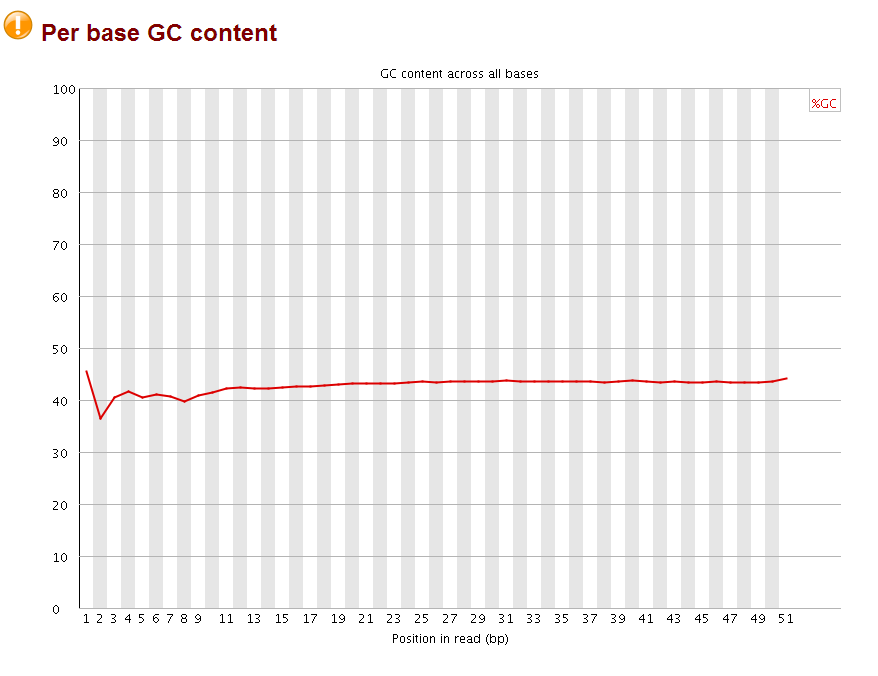 The perbase quality was improved and the per base GC content became more normal (should be 25% percent for each A,T,C,G base, it looks like the sequences are more A/T rich). More importantly, no overrepresent sequences were found anymore. Now the fastq file is ready for subsequent mapping by bowtie.
sometime ago, I quality controlled a RNA-seq data, and found found many wired things and asked on biostar.


Take home messages:
1)
"The weird per-base content is extremely normal and is typically referred to as the "random" hexamer effect, since things aren't actually amplified in a uniform manner. Most people will have this and it's nothing to worry about. BTW, don't let anyone talk you into trimming that off, it's the legitimate sequence."
2)
"Duplicates are expected in RNAseq. Firstly, your samples are probably full of rRNAs, even if you performed ribodepletion. Secondly, any highly expressed gene is going to have apparent PCR duplication due solely to it being highly expressed (there is a ceiling on the coverage you can get before running into this, it's pretty high with paired-end reads but not infinite)."
3)Several posts for whether the duplicates need to be removed or not.
https://www.biostars.org/p/55648/
https://www.biostars.org/p/66831/
https://www.biostars.org/p/14283/
Currently, I do not remove them. That's all for today!
OK, let me go back to this post. things to remember:
1) You must quality control your fastq files first by fastqc. Trim the adapters and low quality bases by trimmomatic.
2) The fastq files dumped from the SRA GEO repository are usually the raw sequence, you need to quality control them.
3) google, google before you ask anyone else!
Let's start.
inspecting the first several reads of the fastq (this is a ChIP-seq data), I found the quality is coded as phred33
@SRR866627_nutlin_p53.1 HWI-ST571:161:D0YP4ACXX:3:1101:1437:2055 length=51
NCGAAAGACTGCTGGCCGACGTCGAGGTCCCGATTGTCGGCGTCGGCGGCA
+SRR866627_nutlin_p53.1 HWI-ST571:161:D0YP4ACXX:3:1101:1437:2055 length=51
#1:AABDDH<?CF<CFHH@D:??FAEE6?FHDAA=@CF@4@EBA88@;575
@SRR866627_nutlin_p53.2 HWI-ST571:161:D0YP4ACXX:3:1101:1423:2163 length=51
GAAATACTGTCTCTACTAAAAATACAAAAAGTAGCCAGGCGTCGTGGTGCA
+SRR866627_nutlin_p53.2 HWI-ST571:161:D0YP4ACXX:3:1101:1423:2163 length=51
B@CFFFFFHHHHGIJJJJIJJJIJJJJIJJIEGHIJJJJIJIIIHIE=FGC
  SSSSSSSSSSSSSSSSSSSSSSSSSSSSSSSSSSSSSSSSS.....................................................
  ..........................XXXXXXXXXXXXXXXXXXXXXXXXXXXXXXXXXXXXXXXXXXXXXX......................
  ...............................IIIIIIIIIIIIIIIIIIIIIIIIIIIIIIIIIIIIIIIII......................
  .................................JJJJJJJJJJJJJJJJJJJJJJJJJJJJJJJJJJJJJJJ......................
  LLLLLLLLLLLLLLLLLLLLLLLLLLLLLLLLLLLLLLLLLL....................................................
  !"#$%&'()*+,-./0123456789:;<=>?@ABCDEFGHIJKLMNOPQRSTUVWXYZ[\]^_`abcdefghijklmnopqrstuvwxyz{|}~
  |                         |    |        |                              |                     |
 33                        59   64       73                            104                   126
  0........................26...31.......40
                           -5....0........9.............................40
                                 0........9.............................40
                                    3.....9.............................40
  0.2......................26...31.........41

 S - Sanger        Phred+33,  raw reads typically (0, 40)
 X - Solexa        Solexa+64, raw reads typically (-5, 40)
 I - Illumina 1.3+ Phred+64,  raw reads typically (0, 40)
 J - Illumina 1.5+ Phred+64,  raw reads typically (3, 40)
     with 0=unused, 1=unused, 2=Read Segment Quality Control Indicator (bold)
     (Note: See discussion above).
 L - Illumina 1.8+ Phred+33,  raw reads typically (0, 41)
then I used fastqc to check the quality:
the quality for each base is very good, but the perbase sequence content does not look good, and the adapters are not trimmed as indicated by the overrepresented sequences (highlighted part is part of the Truseq adapter index1).
Then I used Trimmomatic to trim the adapters and the low quality bases.
$ trimmomatic SE in.fastq in_trimmed.fastq ILLUMINACLIP:Truseq_adaptor.fa:2:30:10 LEADING:3 TRAILING:3 SLIDINGWINDOW:4:15 MINLEN:36
$ cat Truseq_adaptor.fa
>TruSeq_Universal_Adapter
AATGATACGGCGACCACCGAGATCTACACTCTTTCCCTACACGACGCTCTTCCGATCT
>TruSeq_Adapter_Index_1
GATCGGAAGAGCACACGTCTGAACTCCAGTCACATCACGATCTCGTATGCCGTCTTCTGCTTG
>TruSeq_Adapter_Index_2
GATCGGAAGAGCACACGTCTGAACTCCAGTCACCGATGTATCTCGTATGCCGTCTTCTGCTTG
>TruSeq_Adapter_Index_3
GATCGGAAGAGCACACGTCTGAACTCCAGTCACTTAGGCATCTCGTATGCCGTCTTCTGCTTG
>TruSeq_Adapter_Index_4
GATCGGAAGAGCACACGTCTGAACTCCAGTCACTGACCAATCTCGTATGCCGTCTTCTGCTTG
>TruSeq_Adapter_Index_5
GATCGGAAGAGCACACGTCTGAACTCCAGTCACACAGTGATCTCGTATGCCGTCTTCTGCTTG
>TruSeq_Adapter_Index_6
GATCGGAAGAGCACACGTCTGAACTCCAGTCACGCCAATATCTCGTATGCCGTCTTCTGCTTG
>TruSeq_Adapter_Index_7
GATCGGAAGAGCACACGTCTGAACTCCAGTCACCAGATCATCTCGTATGCCGTCTTCTGCTTG
>TruSeq_Adapter_Index_8
GATCGGAAGAGCACACGTCTGAACTCCAGTCACACTTGAATCTCGTATGCCGTCTTCTGCTTG
>TruSeq_Adapter_Index_9
GATCGGAAGAGCACACGTCTGAACTCCAGTCACGATCAGATCTCGTATGCCGTCTTCTGCTTG
>TruSeq_Adapter_Index_10
GATCGGAAGAGCACACGTCTGAACTCCAGTCACTAGCTTATCTCGTATGCCGTCTTCTGCTTG
>TruSeq_Adapter_Index_11
GATCGGAAGAGCACACGTCTGAACTCCAGTCACGGCTACATCTCGTATGCCGTCTTCTGCTTG
>TruSeq_Adapter_Index_12
GATCGGAAGAGCACACGTCTGAACTCCAGTCACCTTGTAATCTCGTATGCCGTCTTCTGCTTG
after that, I checked the with fastqc again:
sometime ago, I quality controlled a RNA-seq data, and found found many wired things and asked on biostar.
Take home messages:
1)
"The weird per-base content is extremely normal and is typically referred to as the "random" hexamer effect, since things aren't actually amplified in a uniform manner. Most people will have this and it's nothing to worry about. BTW, don't let anyone talk you into trimming that off, it's the legitimate sequence."
2)
"Duplicates are expected in RNAseq. Firstly, your samples are probably full of rRNAs, even if you performed ribodepletion. Secondly, any highly expressed gene is going to have apparent PCR duplication due solely to it being highly expressed (there is a ceiling on the coverage you can get before running into this, it's pretty high with paired-end reads but not infinite)."
3)Several posts for whether the duplicates need to be removed or not.
https://www.biostars.org/p/55648/
https://www.biostars.org/p/66831/
https://www.biostars.org/p/14283/
Currently, I do not remove them. That's all for today!
Tuesday, June 17, 2014
& or && operator in R
I will defend next Tuesday. To relieve my anxiety a little bit, I decide to blog a little bit.
I am confused about the operator & and && in R, which one should I use?
It turns out:
"The shorter ones are vectorized, meaning they can return a vector, The longer form evaluates left to right examining only the first element of each vector"
an example would suffice to explain it.
> x<-c(1:10)
> x
[1] 1 2 3 4 5 6 7 8 9 10
> x>8
[1] FALSE FALSE FALSE FALSE FALSE FALSE FALSE FALSE TRUE TRUE
> logical1<- x>8
> logical2<- x<5
> logical1
[1] FALSE FALSE FALSE FALSE FALSE FALSE FALSE FALSE TRUE TRUE
> logical2
[1] TRUE TRUE TRUE TRUE FALSE FALSE FALSE FALSE FALSE FALSE
> logical1 | logical2
[1] TRUE TRUE TRUE TRUE FALSE FALSE FALSE FALSE TRUE TRUE
> logical1 & logical2
[1] FALSE FALSE FALSE FALSE FALSE FALSE FALSE FALSE FALSE FALSE
> logical1 && logical2
[1] FALSE
one can subset the vector by the logical vectors:
> x[logical1]
[1] 9 10
> x[logical2]
[1] 1 2 3 4
I am confused about the operator & and && in R, which one should I use?
It turns out:
"The shorter ones are vectorized, meaning they can return a vector, The longer form evaluates left to right examining only the first element of each vector"
an example would suffice to explain it.
> x<-c(1:10)
> x
[1] 1 2 3 4 5 6 7 8 9 10
> x>8
[1] FALSE FALSE FALSE FALSE FALSE FALSE FALSE FALSE TRUE TRUE
> logical1<- x>8
> logical2<- x<5
> logical1
[1] FALSE FALSE FALSE FALSE FALSE FALSE FALSE FALSE TRUE TRUE
> logical2
[1] TRUE TRUE TRUE TRUE FALSE FALSE FALSE FALSE FALSE FALSE
> logical1 | logical2
[1] TRUE TRUE TRUE TRUE FALSE FALSE FALSE FALSE TRUE TRUE
> logical1 & logical2
[1] FALSE FALSE FALSE FALSE FALSE FALSE FALSE FALSE FALSE FALSE
> logical1 && logical2
[1] FALSE
one can subset the vector by the logical vectors:
> x[logical1]
[1] 9 10
> x[logical2]
[1] 1 2 3 4
Subscribe to:
Posts (Atom)